
I wrote a brief article about my experimentation with N8N, an automation platform with many native AI integrations. You can read that here. In that post I described a few proof of concepts I built integrating Login Enterprise.
Taking that knowledge a little farther, I wanted to experiment with a Retrieval-Augmented Generation (RAG) system. To do so, I first wrote a script to scrape the HTML contents of the Login VSI Knowledge Base. This amounted to 38 articles and only 550kb of data, not nearly enough for robust knowledge.
With limited data the vector space becomes sparse. This causes the model to return similar answers for different but nuanced questions, simply because the embedding space doesn’t have enough coverage to distinguish them.
Building a more robust corpus and database ensures there is diverse content for the model to leverage when responding to prompts improving accuracy and subtle nuances.
This blog covers some of my work in this area, including learnings. The main takeaway is the importance of a robust vector space for similarity searches. Generating synthetic content is useful to plug the gaps, but what happens when the models we rely on for education, in politics or the public square is trained on vast amounts of made up information?
Vector embedding the knowledge base
In this proof of concept, I used a Python script to extract documentation content from the knowledge base. Limits on volume of data meant that Github was perfectly suitable for this storage, and wanting to limit dependencies underscored that idea.

Pinecone was used as a Vector store, unlike my previous post which only used built-in N8N memory capabilities.
Generating synthetic question-answer pairings
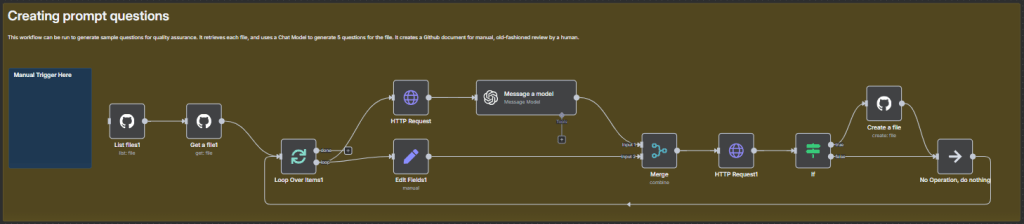
A commonly used technique in scenarios where there is limited data is, apparently, to generate synthetic question-answer pairings. Quite simply, you can feed each article into an LLM prompting for 5 questions in a tidy format based on the article at hand.
This pipeline:
- Lists all files in the Github repo
- Gets metadata, such as raw download link
- Downloads its contents
- Sends it to the LLM, prompting for N questions
- Performs error-handling, verifying that
repo/questions/<article>doesn’t already exist. If not, it creates it.
Next, you can feed the article and its comprehension quiz into the LLM, prompting it to analyze the article and answer each of the questions, providing answers in an equally-tidy format as the ones it received.
Next, the answers generation. In a similar order of operations, we get each file in the repo, then its contents. An AI Agent deemed the “Product Expert” agent was used in this example. It had these tools available:
- OpenAI Chat Model
- Vector Store Tool
- PineCone Vector Store (Retrieval node)
- OpenAI Embeddings Node
- Open AI Chat Model
- PineCone Vector Store (Retrieval node)
After some similar error-handling I had already implemented above (so why not use here too!) it created 38 files in my /answers folder.

Sample q/a pair
Below a sample q/a pair is included. You’ll have to believe me that this is an accurate response to this question. Glass half empty, users of such a product would immediately spam it with the most difficult questions. So, this likely isn’t enough.
{
"article": "application-testing-results",
"question": "What information is displayed in the Platform Summary section of a single Application Test result?",
"answer": "The Platform Summary section of a single Application Test result displays the following information:\n - Logon performance:\n - Actual: The actual time it took to log in.\n - Threshold: The login time threshold set in the Test.\n - Execution: Green if the login was successful, regardless of the time taken.\n - Performance: Green if the actual login time was below the threshold or if no threshold was set; red if the actual time exceeded the threshold."
}
What next
As the next steps here, I will start experimenting with Azure OpenAI Labs. Much of this functionality can be implemented there as well.

Leave a comment