
In previous posts, we covered Azure’s primary autoscaling capability, Power management autoscaling. It uses a matrix of rules defined across four periods of the day (Ramp-up, peak, ramp-down, off-peak hours) to power-on and power-off session host VMs.
In this article, we’ll cover Azure’s Preview capability, Dynamic autoscaling – how it’s different than Power management autoscaling, additional benefits, and its limitations. First, we’ll walkthrough the configuration wizard and discuss available settings.
Configuring dynamic autoscaling
While in Preview mode, Dynamic autoscaling goes further than Power management autoscaling by creating and deleting session hosts.
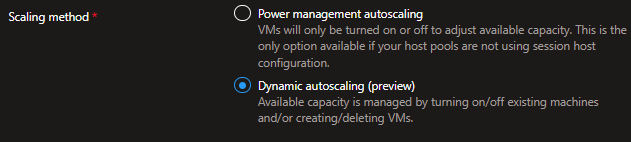
Already the settings in the Add a schedule wizard differ than those for Power management autoscaling:
- Minimum host pool size is base capacity floor (the min. number of hosts in the pool, whether running or stopped)
- Maximum host pool size is the capacity ceiling; the max. number of session hosts that Autoscale can create
- Minimum percentage of active hosts is the minimum percentage of session hosts that should be always available. If this value is set to 10% and the Minimum host pool size is 10, Autoscale will ensure 1 session host is available.
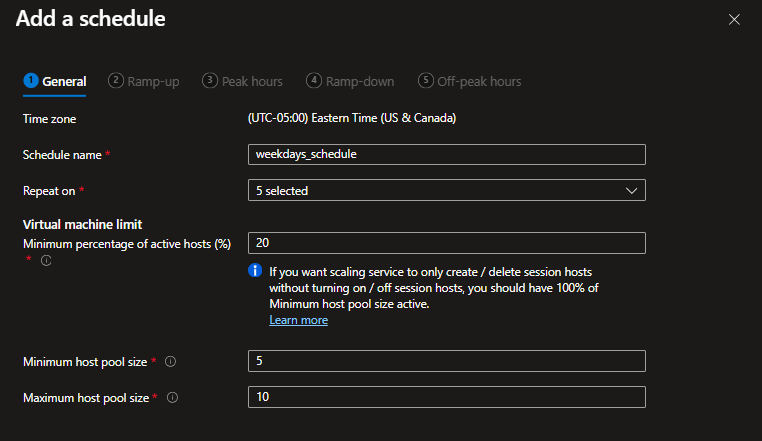
Note the tooltip’s suggestion that a 100% setting for the Minimum percentage of active hosts will force autoscale to only create and delete hosts as opposed to starting and stopping them.
The Add a schedule wizard has the same flow as the Power management autoscaling, including the same usage periods:
- Ramp-up
- Peak hours
- Ramp-down
- Off-peak hours
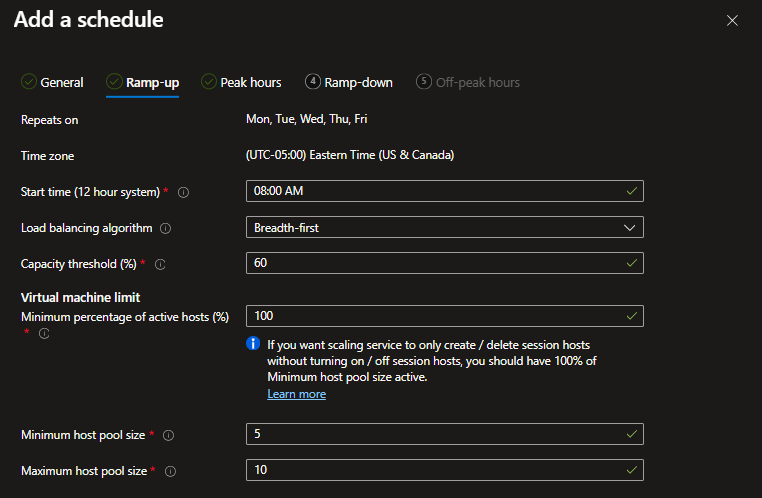
The Ramp-down schedule has added some options for forced logoffs. These settings work the same as when configured for Power Management autoscaling – except for the fact that Autoscaling can now delete unused session hosts as opposed to just deallocating them.

During off-peak hours using an aggressive capacity threshold and minimum active host percentage can provide cost savings by only spinning up session hosts ad hoc.

What next?
We’ve now covered the generally available Power management autoscaling and Azure’s Preview capabilities around Dynamic autoscaling. In future articles, we’ll directly compare the two solutions. See you there.

Leave a comment