Power Management Autoscaling in AVD
What is autoscaling?
By default, Azure Virtual Desktop (AVD) session hosts are statically deployed. While powered on, they incur compute and storage costs. Deallocating VMs saves compute costs, though storage expenses persist. Autoscaling provides demand elasticity by expanding and contracting capacity based on user demand to optimize costs.
A scaling plan can apply to multiple host pools, but each host pool uses only one scaling plan. Plans support multiple schedules for varying requirements like weekdays versus weekends. Autoscale ignores drain mode settings and, in pooled scenarios, ignores load balancing algorithms in favor of those defined in the scaling plan.
Azure’s generally available autoscaling is Power management autoscaling, which adjusts available capacity by powering session hosts on and off based on demand.
Configuring Scaling Plans
Admins select their scaling type after providing metadata like name, resource group, and region. Scheduling options differ between pooled and personal scenarios.
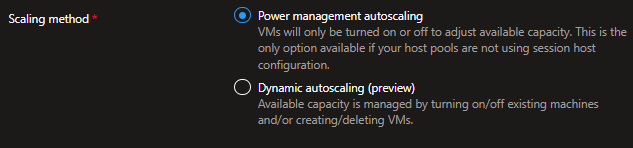
The day conceptually includes four periods:
- Ramp-up (start of day)
- Peak hours (highest usage)
- Ramp-down (users logging off)
- Off-peak hours (lowest usage)
Pooled Schedules
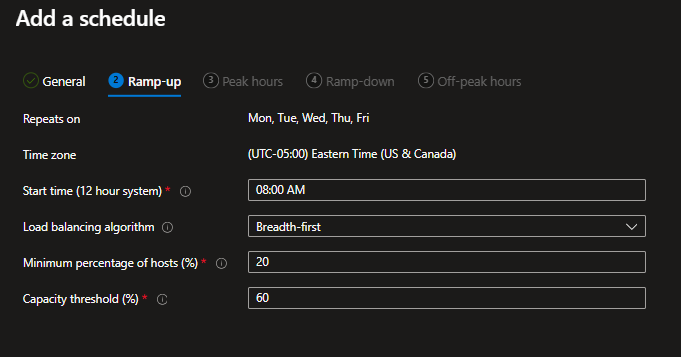
Admins specify ramp-up start time, desired load-balancing algorithm, “Minimum percentage of hosts (%)” and “Capacity threshold”:
- Start time: When ramp-up logic begins
- Minimum percentage of hosts: Percentage of session hosts to start during ramp-up/peak hours (e.g., 10% of 10 hosts = 1 VM)
- Capacity threshold: Percentage of capacity usage triggering autoscaling evaluation
- Load balancing algorithm: Breadth-first during ramp-up (distributing users to least busy hosts)
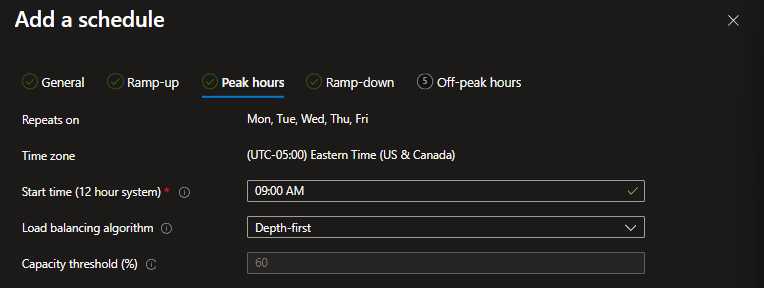
Peak hours use identical settings except load balancing switches to depth-first for efficient resource utilization.
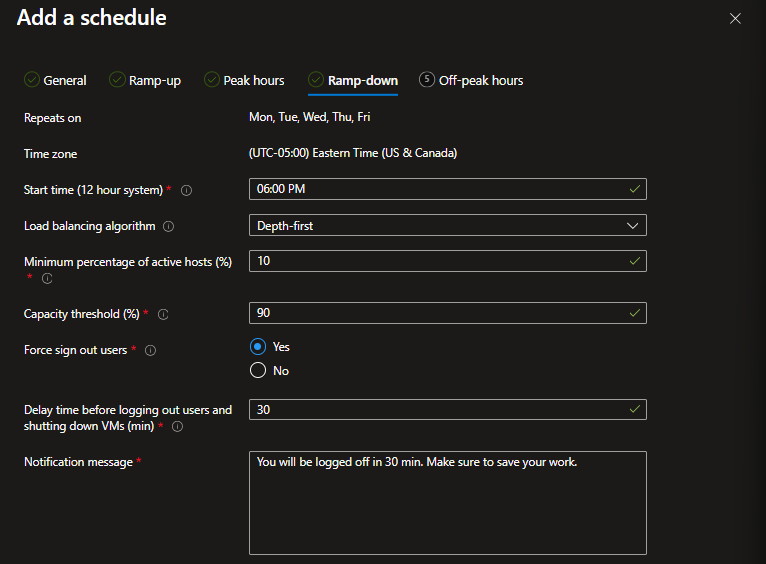
Ramp-down settings include:
- Minimum percentage of active hosts to leave powered on during off-peak
- Capacity threshold (higher value allowing host power-down)
- Force sign-out options with delay time settings
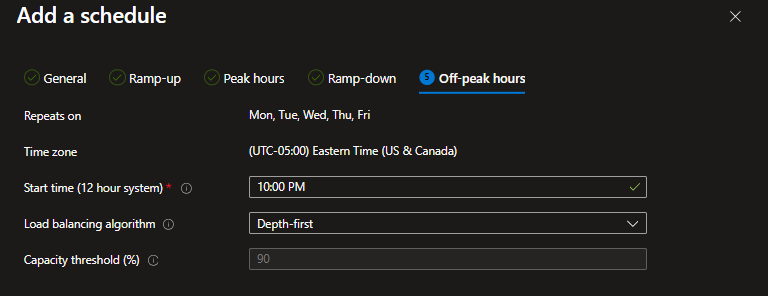
Off-peak hours offer only capacity threshold configuration.
Personal Schedules
Personal pools allow more aggressive management through ramp-up options:
- Start VM on Connect capability for keeping hosts powered off until needed
- VMs to start controls which machines power on automatically
- Don’t turn VMs on setting with Start VM on Connect maximizes cost savings but may delay logins
Personal pools include unique Disconnect and Sign Out settings:
- Disconnected for N minutes: take no action, Hibernate, or Shutdown
- Logged off for N minutes: same options available
These settings allow time-dependent optimization strategies, though hibernation and shutdown cause login delays when users reconnect.
What next?
In a follow-up article, we’ll cover Dynamic autoscaling, Azure’s preview capability that goes beyond power management by creating and deleting session hosts.