Using Spec-Driven Development
Going to share my experiences adopting spec-driven development frameworks with LLM Coding Agents, specifically Spec-Kit. I’ll cover what Spec-Kit is, how to use it, and the benefits it brings to structuring development, reducing guesswork, and enforcing best practices.
The problem space
I was in the first 0.3% of all ChatGPT users to adopt the platform, and I actually in the top 1% for messages sent (as of 12/22/25). For coding use cases, I would request small functions or copy entire code files into ChatGPT, copying code between Chrome and VS Code. AI gave me the ability to implement more complex solutions but the double-edged sword revealed that context degradation was serious. Before the idea of ‘projects’ or Claude in your terminal, for the models to have enough context, you’d have to paste in entire files with little hints along the way. Otherwise, it would hallucinate methods or attributes and often introduce bugs without a critical eye.
With Claude Code, the agent sits in your codebase - a step further than ChatGPT Claude’s projects idea goes. This means Claude can always use the latest changes to update its context, and has access to every file you elect. But a similar problem arises when you try to oneshot big features or use standard multi-turn prompting to yield a product or solution. The AI gets ahead of itself, or doesn’t make enough progress. If you’re trying to build something complex in just a few prompts, it may be difficult to unwind changes, although some of this could be solved with a thorough CLAUDE.md file requiring Git hygeine.
Spec-Kit
Spec-driven development uses code specification documents as the foundation for atomized, executable tasks. Traditionally, developers read specs then began work, with the spec losing importance as the codebase evolved. LLMs now enable developers to invest more cycles in detailed upfront planning, since Agents can develop much faster.
For more information, check out their Git repo.
/Speckit.Constitution
This establishes guiding principles for the coding agent. A constitution prompt typically includes principles on quality, testing, user experience, and performance. The constutition can contain stylistic rules as well.
Similar to the CLAUDE.md file, the constitution acts as rule-based guidance for the LLM. However, the constitution is project-oriented and changes infrequently, whereas CLAUDE.md documents coding conventions and operational guidance, evolving as projects grow to balance context and awareness.
The distinction: CLAUDE.md explains how the AI should operate; the Constitution defines what must be done and what must never be done.
/Speckit.specify
This command lets users define what the project is—through a user experience lens, not technical terms. Thinking like a product manager, focusing on outcomes rather than the tech stack. “I want to build an app to…”
Claude generates a specification with a high-level project overview, grounded in user scenarios and test cases including robust requirements including tests.
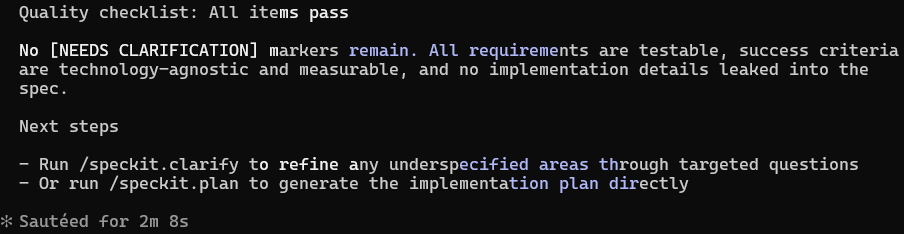
/Speckit.Clarify
This refines requirements or user scenarios not fully covered initially. As the creator of Claude Code notes, “pour your energy into the plan.”
An automatically generated quickstart.md file typically includes project setup commands, usage guidance, and test automation details—delivering well-documented solutions without busywork.
/Speckit.Plan
Run once the spec is complete. Plan uses requirements, user scenarios, and the tech stack to generate detailed implementation steps in smallest practical units. It includes architecture overviews, component descriptions, and key technical decisions with rationale.
Claude and Speckit update the CLAUDE.md file during refinement to capture critical information about requirements and tech stack decisions.

/Speckit.tasks
Tasks reads the Plan and produces dozens of concrete implementation steps, organized by category or user story. This prevents “slopification” by enforcing structured, documented, and rationalized change—unlike native LLM development with untracked changes.
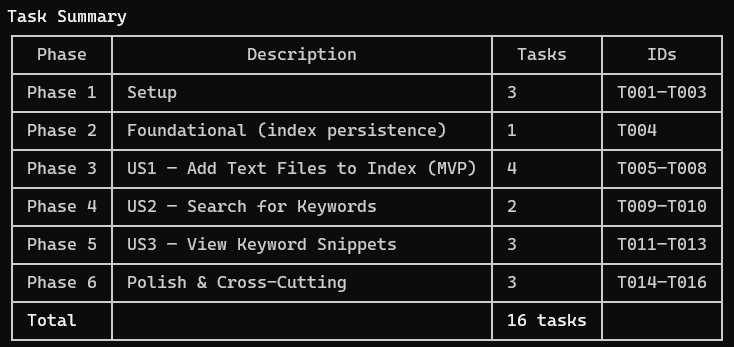
My first time using Speckit, I was in awe watching it create its own implementation checklist based on a thorough Plan, then execute it while checking off tasks progressively.
/Speckit.analyze
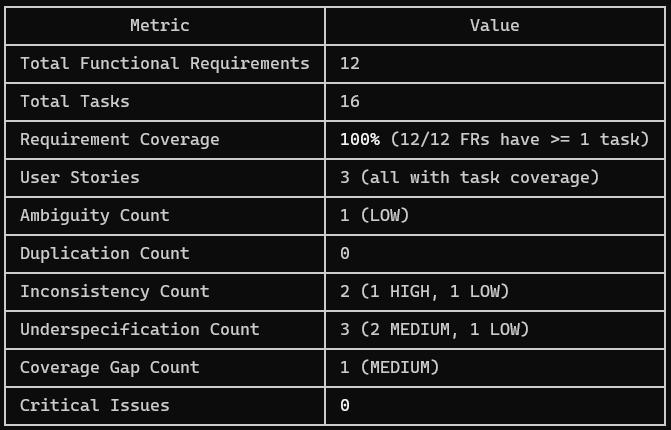
Analyze is an overlook command. After /Speckit.tasks but before /Speckit.implement, tasks can be analyzed for consistency and coverage across the codebase.
Here, one HIGH priority issue creating inconsistency across the codebase was easily resolved using this detailed analysis. This would’ve been compounded without taking one extra step to resolve it.
Integrating with Git for version control
Spec-Kit, built by the GitHub team, integrates tightly with Git for version control. When a spec is created, it opens a new branch in the repository.
Changes develop in isolation, then merge into the main branch, keeping master branches clean while preserving spec-based branches as clear, auditable units of work.
Takeaways
- Introduce features or bug-fixes through specs to add structure and reduce guesswork and repeated reworking
- Use
CLAUDE.mdandConstitution.mdto require thorough test cases and clear decision rationale - Spend most energy on Planning to avoid cleanup cycles—address user scenarios, requirements, and edge cases upfront, using
/Speckit.clarifyand/Speckit.analyzeto verify gaps and consistency
Thanks for reading!